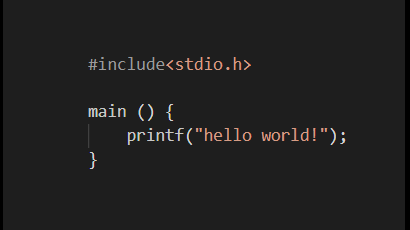
In this post you will be able to run and understand your first C file. I usually run (.c) files on VSCode. If you have any questions on how to run C files on VSCode check this.
Libraries
The code shown in the image above can be strange to first sight. But it is actually pretty simple and logical to understand after been explained. In fact let’s look for the first line written.
#include<stdio.h>
The first time I saw C programming language, this line of code for itself made me feel challenged. But it is actually one of the simplest and easiest part to understand. When we write this line we basically are fetching and including a library of functions called stdio (abbreviation of standard inputs outputs) .
Functions
main();
Now let’s introduce functions! The first function presented in a C file, for my level of knowledge, is main() function:
main() {
}
As the name suggests it is the main (i.e elementary) function when writing a program in C. The syntax to call a function is name_of_the_funtion() {}. We will look what is inside of the parentheses in further chapters but depending on the function we are dealing it can be (inputs, conditions, void etc).
What differentiate the main() function from others?
The only difference is that the main() function is “called” by the OS (operating system) when the user runs the C program.
The second pair of brackets that look like this {} are where the code run when the function is called. Notice that I gave a space to insert code between the two {}. Also, take a note on the alignment of the closed brackets with the “m” of the main() function. That is called indentation. If I had to point the second most common error among rookies it would certainly be misplaced closed parantheses like this ones.
printf();
In order to warn about the most common mistake we need to take one more step into the code. The next piece of code and last for this exercise is the following one.
printf(“hello world”);
The function above is fetched from the inicial library stdio.h where the OS can find out what to do with it. printf() is the function that allows to output something for the user. When running a C file with a printf() we will see certain output if the code is well structured. Inside of the parentheses we can write between the ” ” whatever we want to be printed. There are many variants on this function that I consider not so intuitive but they are still pretty easy to understand if you stick to me this far. We will see how we can use also this function for error detection.
Now as promise the most common mistake is the missing ; in the final of the processment lines. I call processment coding for the code that actually do something.


 Coding Beyond Zero